ben's boxes
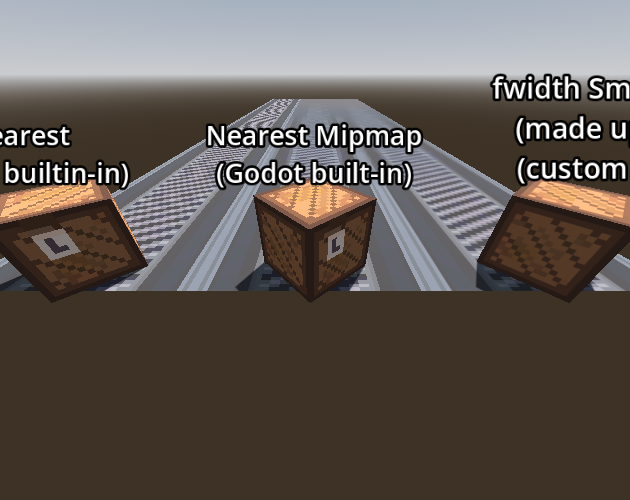
This is a small demo project showing the difference between two approaches for pixel art sampling when using pixel art as the texture for 3D meshes.
The left set of objects is plain nearest neighbor interpolation. The middle set is using Godot's "Nearest Mipmap," which I would guess (but have not researched!!) is basically using mipmaps that are themselves blurred, but still using nearest neighbor for the interpolation. The right set of objects is using a shader based on smoothly interpolating between the edges of pixels when necessary, using fwidth() to compute the threshold (so that it smoothly changes based on the distance to the sampled pixels, essentially).
This last approach can be thought of as similar to using linear interpolation IF the mesh texture was itself the pixel art scaled up arbitrarily large using nearest neighbor interpolation.
You can use WASD to move around the camera and the arrow keys to rotate it.
My ranking of the approaches would be:
- The last one is the best, as it gives the sharpest looking pixels and smooth motion. However, it is the most tedious to set up in engine. In Godot in particular, it seems like it requires manually setting the texture size as well, which is extra work or requires extra scripting or a good tool script setup. It is also inconvenient when compared to the built-in materials, because you cannot easily enable and disable features (you either have to build one uber-shader that has all the standard 3D material properties, or manually create configurations. Again, a helper engine plugin would probably go a long way here).
- The middle one is pretty good. It fixes the most severe aliasing issues and the pixels in the distance look reasonably crisp. It is not perfect, especially in motion (e.g. try moving the camera around), and there is some aliasing. It is much more convenient in-engine. It also likely has meaningfully better performance than the smoothed fwidth() setup, as fwidth() itself is somewhat expensive.
- The first one (pure nearest neighbor) is pretty bad in my opinion. The aliasing is severe and looks bad, both still and in motion.
For reference, here is the shader I used for the last option, in GDShader form. It is likely expressible in a cleaner way using smoothstep() and friends. You can look up terms like "pixel art fwidth" or "fwidth smoothstep" to find additional reading about this kind of shader.
// NOTE: Shader automatically converted from Godot Engine 4.6.stable's StandardMaterial3D.

shader_type spatial;
render_mode blend_mix, depth_draw_opaque, cull_back, diffuse_burley, specular_schlick_ggx;

uniform vec4 albedo : source_color;
uniform sampler2D texture_albedo : source_color, filter_linear_mipmap, repeat_enable;
uniform ivec2 albedo_texture_size;
uniform float point_size : hint_range(0.1, 128.0, 0.1);

uniform float roughness : hint_range(0.0, 1.0);
uniform sampler2D texture_metallic : hint_default_white, filter_linear_mipmap, repeat_enable;
uniform vec4 metallic_texture_channel;
uniform sampler2D texture_roughness : hint_roughness_r, filter_linear_mipmap, repeat_enable;

uniform float specular : hint_range(0.0, 1.0, 0.01);
uniform float metallic : hint_range(0.0, 1.0, 0.01);

uniform vec3 uv1_scale;
uniform vec3 uv1_offset;
uniform vec3 uv2_scale;
uniform vec3 uv2_offset;

void vertex() {
	UV = UV * uv1_scale.xy + uv1_offset.xy;
}

float map_uv(float uv, float tps) {
    float t0 = uv / tps;
    float a = floor(t0);
    float sps = fwidth(uv);
    //float b = a + 1.0;
    float scale = tps / sps;

    float t = t0 - a;
    if(t < 0.5) {
        t = clamp(t * scale, 0.0, 0.5);
    }
    else {
        t = 1.0 - t;
        t = clamp(t * scale, 0.0, 0.5);
        t = 1.0 - t;
    }

    return (a + t) * tps;
}

void fragment() {
	vec2 base_uv = UV;

	vec2 uv = UV;
	uv.x = map_uv(UV.x, 1.0 / float(albedo_texture_size.x));
	uv.y = map_uv(UV.y, 1.0 / float(albedo_texture_size.y));
	vec4 albedo_tex = texture(texture_albedo, uv);
	ALBEDO = albedo.rgb * albedo_tex.rgb;

	float metallic_tex = dot(texture(texture_metallic, base_uv), metallic_texture_channel);
	METALLIC = metallic_tex * metallic;
	SPECULAR = specular;

	vec4 roughness_texture_channel = vec4(1.0, 0.0, 0.0, 0.0);
	float roughness_tex = dot(texture(texture_roughness, base_uv), roughness_texture_channel);
	ROUGHNESS = roughness_tex * roughness;
}
Leave a comment
Log in with itch.io to leave a comment.